Sora 2
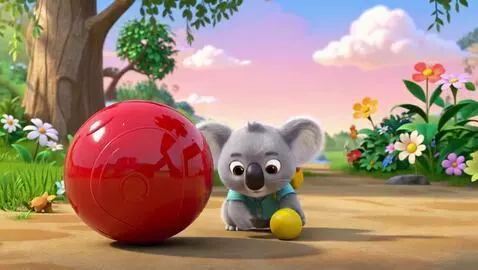
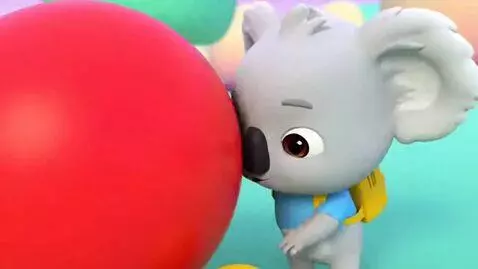
Create a bright, adorable, high-quality 3D animated educational video for toddlers and preschool children aged approximately 2–5. MAIN CHARACTER: Coco is a tiny, adorable baby koala with soft light-grey fur, large warm brown eyes, a small round black nose, fluffy round ears, chubby cheeks and a sweet, playful expression. Coco has a small yellow backpack and wears a simple pastel-blue shirt. Coco should look cute, friendly and highly recognizable. IMPORTANT CHARACTER CONSISTENCY: Coco must look exactly the same throughout the entire video. Keep the same face, fur colour, body proportions, clothing, backpack and animation style in every scene. SETTING: The video takes place in Coco's Corner, a magical, colourful learning world designed for young children. The environment is cheerful and welcoming, with soft pastel colours, flowers, trees, clouds, colourful shapes and playful objects. Everything should feel safe, warm and joyful. VIDEO TOPIC: LEARNING OPPOSITES — BIG AND SMALL STORY: Coco walks into Coco's Corner and discovers two objects: a HUGE red ball and a tiny yellow ball. Coco looks at the huge ball and says excitedly: "Wow! Look at this BIG ball!" Coco then picks up the tiny ball: "And look! This one is SMALL!" Coco places the two balls next to each other. A cheerful narrator says: "Big and small! Can you say it with Coco?" Coco says: "BIG!" The huge ball bounces. Coco says: "SMALL!" The tiny ball bounces. Then show several fun examples: A BIG elephant next to a SMALL mouse. A BIG tree next to a SMALL flower. A BIG teddy bear next to a SMALL teddy bear. After each example, pause briefly so children can identify which object is big and which is small. End with Coco happily waving at the camera and saying: "Great job! You learned BIG and SMALL with Coco!" STYLE: Cute premium children's animation, soft rounded 3D characters, expressive faces, gentle movements, bright but soothing colours, playful environments, polished children's television aesthetic, clean composition, simple visual storytelling, wholesome and educational. CAMERA: Slow, gentle camera movements. Use close-ups when Coco speaks and wider shots when showing comparisons. Keep the important objects large and clearly visible. AUDIO: Use a cheerful, gentle children's narrator and Coco's cute child-friendly voice. Add soft playful background music and subtle sound effects such as bouncing balls and happy sparkles. Do not imitate or resemble any existing children's song, character, show or copyrighted franchise. IMPORTANT: Everything must be completely original. Do not reference Baby Shark, Cocomelon, Disney, Pixar or any existing children's character or franchise. Do not copy the visual style, melodies, lyrics, characters or story structure of existing children's content. FORMAT: 16:9 landscape YouTube video. Length: approximately 60–90 seconds. Designed specifically for toddlers and preschool children.
Variations of the same prompt, generated by different AI models…